Inspect and decode gRPC and Protocol Buffers
gRPC is fast and compact precisely because it is hard to read: protobuf messages are binary, framed inside HTTP/2 streams, and the real call status lives in trailers, not the HTTP status line. A normal proxy shows you opaque bytes. Fluxzy understands the gRPC framing: it splits the frames, decodes each protobuf message, reads the service, method and gRPC status, and presents it all in a readable view.
This guide captures a gRPC call end to end and decodes it two ways: schema-less out of the box (no .proto needed), then with real field names once you point Fluxzy at your .proto files. It also covers reading the gRPC status and trailers, including errors.
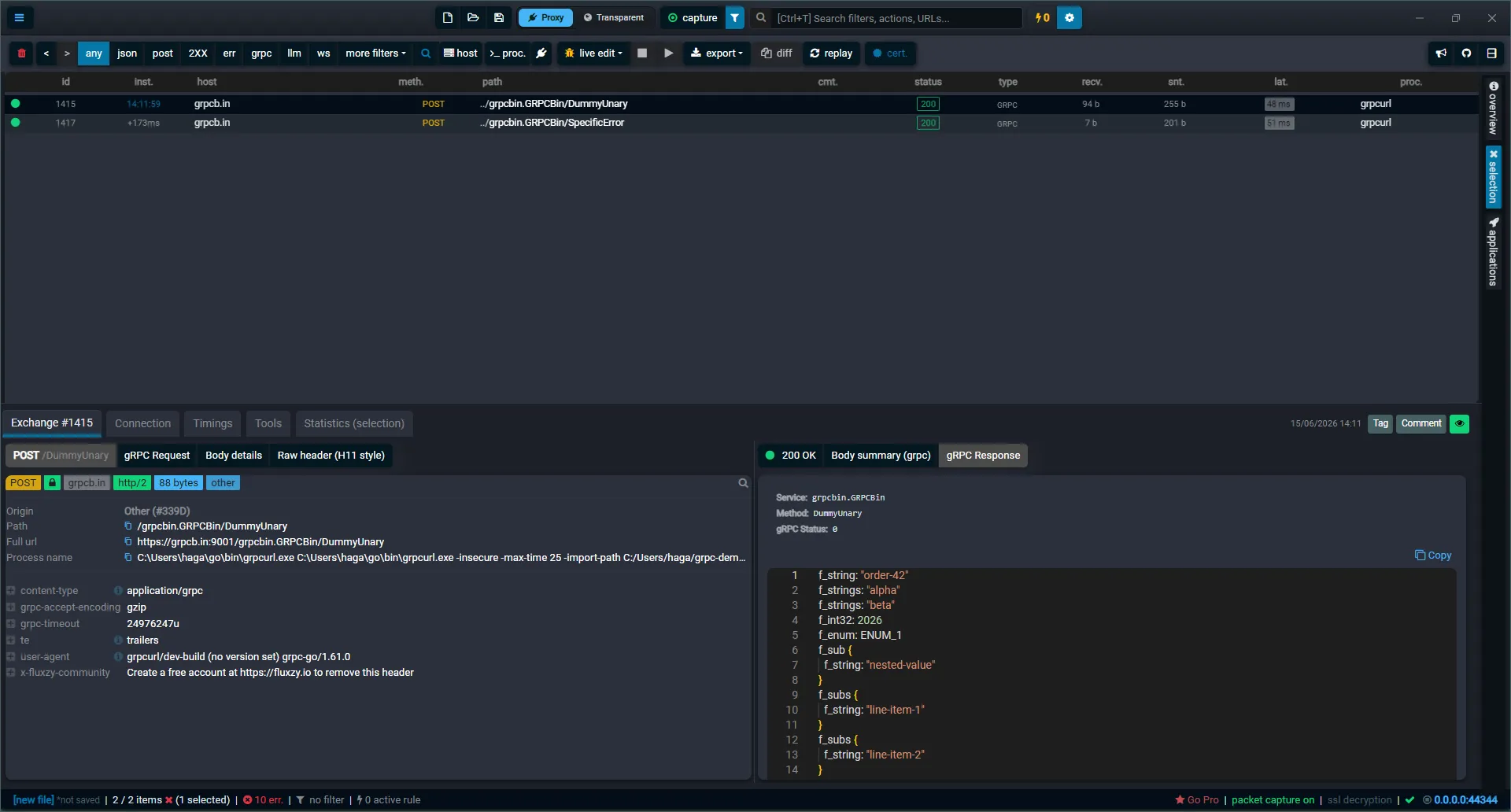
TL;DR. Point your gRPC client at the Fluxzy proxy, make a call, and select it. The gRPC Request and gRPC Response views show the service, method and decoded message. Out of the box the message is decoded schema-less (
field 1,field 2, ...). Add your.protofiles under Global Settings > Capture option > Proto Directories to get real field names and enum labels.
Platform note. The screenshots are from the Windows app. The gRPC views are identical on macOS and Linux.
Why gRPC traffic is hard to read
A gRPC call is an HTTP/2 POST whose body is one or more length-prefixed protobuf frames. Three things make it opaque to ordinary tools:
- The payload is binary protobuf, not text.
- The body is wrapped in gRPC framing (a one-byte compression flag plus a four-byte length, per message).
- gRPC always returns HTTP 200. The real outcome is a
grpc-statuscode carried in the HTTP/2 trailers after the body.
Fluxzy handles all three for you.
How Fluxzy detects and frames gRPC
Fluxzy treats an exchange as gRPC when the request content-type starts with application/grpc. For those exchanges it:
- Parses the service and method from the request path (
/package.Service/Method). - Splits the body into its gRPC frames and decodes each protobuf message (compressed frames are detected and reported rather than guessed at).
- Reads the
grpc-statusandgrpc-messagefrom the response trailers.
Step 1: Route your gRPC client through Fluxzy
Fluxzy captures gRPC the same way it captures any HTTPS traffic: the client connects through the proxy and trusts the Fluxzy certificate. The proxy address is shown in the status bar (commonly 0.0.0.0:44344). If you have not set up capture yet, see Capturing HTTPS traffic.
Most gRPC clients, including grpcurl, honor the standard HTTPS_PROXY environment variable for the connection. Set it, then make a call against the public grpcb.in test server:
export HTTPS_PROXY=http://127.0.0.1:44344

grpcurl -insecure \
  -d '{"f_string":"order-42","f_strings":["alpha","beta"],"f_int32":2026,"f_enum":"ENUM_1","f_sub":{"f_string":"nested-value"},"f_subs":[{"f_string":"line-item-1"},{"f_string":"line-item-2"}],"f_bool":true,"f_int64":"90071992547"}' \
  grpcb.in:9001 grpcbin.GRPCBin/DummyUnary
-insecure tells grpcurl to accept the certificate Fluxzy presents (its man-in-the-middle certificate), so the TLS stream can be decrypted. The call appears in the exchange list as a POST to /grpcbin.GRPCBin/DummyUnary with content type GRPC.
If your client ignores the proxy variable, capture it with Fluxzy's transparent (full-system) capture instead, which intercepts traffic regardless of the client's proxy settings.
For a full walkthrough of pointing a gRPC tool at Fluxzy, see intercepting a gRPC session.
Step 2: Open the gRPC request and response
Select the call in the list. The request panel gains a gRPC Request tab and the response panel a gRPC Response tab, next to the usual header and body-summary tabs. Each gRPC view starts with the call metadata (service, method, and for the response the gRPC status), followed by the decoded message.
Read the message without a schema
Open gRPC Response. Even with no .proto files configured, Fluxzy decodes the protobuf schema-less: it walks the wire format and shows each field by its number and wire type, with nested messages indented:
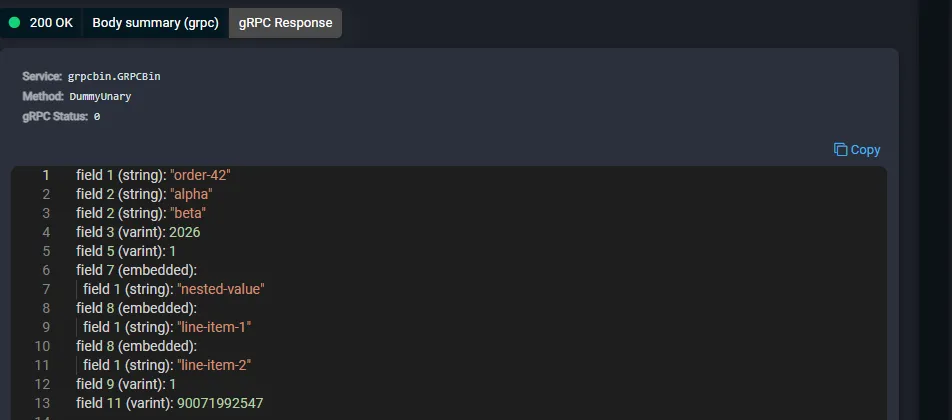
This already tells you a lot: strings, numbers (varint), byte blobs, and nested messages (embedded) are all visible, and repeated fields appear as repeated entries. The gRPC Status: 0 line confirms the call succeeded. What you do not get are the human field names: field 1, field 2, and so on, because the wire format does not carry them.
Decode with real field names: add your .proto files
To turn field 1 into f_string, give Fluxzy the schema. Open Global Settings > Capture option > Proto Directories, click Add directory, and pick a folder that contains your service's .proto files. Fluxzy scans the folder recursively and uses the definitions to decode matching messages.
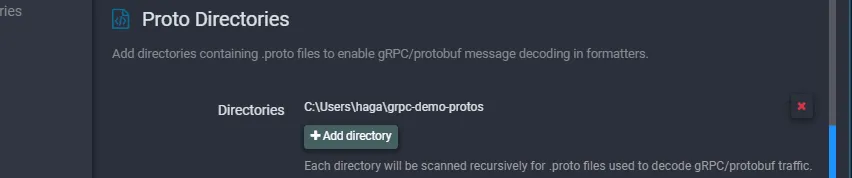
For the example above, a grpcbin.proto describing grpcbin.GRPCBin and its DummyMessage is enough. Fluxzy matches the exchange's service and method to the right message type and decodes the request with the input type and the response with the output type. No protoc is required: Fluxzy compiles the .proto files itself.
The same message, now with field names
Reopen the same exchange. The decoded message now uses real field names, resolves enum values to their labels (f_enum: ENUM_1), labels booleans true/false, and shows nested and repeated messages by name:
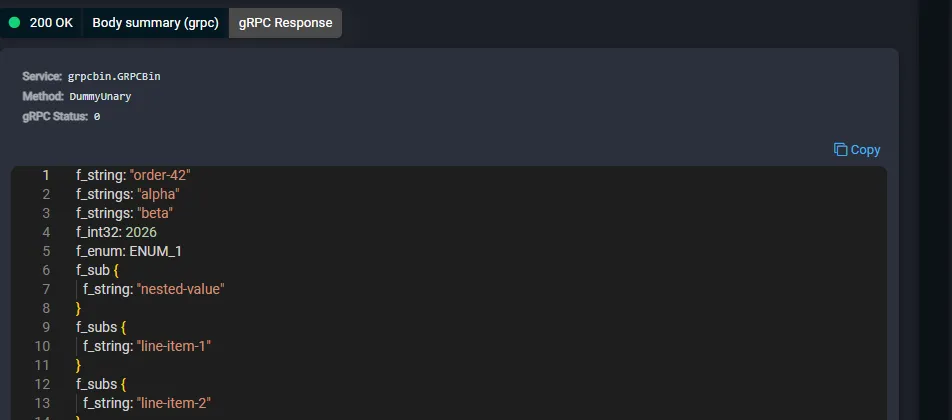
The view title also changes from "Raw protobuf decode" to "Decoded with proto descriptor", so you can always tell which mode produced what you are reading.
Read the gRPC status and trailers
Because gRPC reports failures with HTTP 200 and a trailer, you need the proxy to surface the trailer to know what really happened. Make a call that fails:
grpcurl -insecure \
  -d '{"code":9,"reason":"order already finalized"}' \
  grpcb.in:9001 grpcbin.GRPCBin/SpecificError
The HTTP status is still 200, but the gRPC Response view shows the real outcome from the trailers: a non-zero gRPC Status and the server's gRPC Message:

Here status 9 is FAILED_PRECONDITION and the message is the server's explanation. For an error-only response there is no message body to decode; the status and message are the whole story.
Part of a full decode pipeline
gRPC sits next to Fluxzy's other decoders: JSON, JWT, LLM and AI API streams and WebSocket messages, all reachable from the same exchange detail view. Open the Connection tab to confirm the HTTP/2 protocol and TLS details of the channel, and the Timings tab to see how long the call spent in DNS, TLS and server processing.
Frequently asked questions
Do I need a .proto file to read gRPC in Fluxzy?
No. Fluxzy always decodes the protobuf schema-less, showing field numbers, wire types and structure. A .proto file is only needed to see human field names, enum labels and the exact field types.
Where do I put my .proto files?
Anywhere on disk. Point Fluxzy at the folder under Global Settings > Capture option > Proto Directories. The folder is scanned recursively, so a directory tree of .proto files works.
Why does the exchange show HTTP 200 for a failed gRPC call?
gRPC carries its own status code in the HTTP/2 trailers and almost always uses HTTP 200 at the transport level. Read the gRPC Status row in the gRPC Response view (0 means OK; any other value is an error) rather than the HTTP status.
My gRPC client's traffic is not captured. Why?
The client is probably not using the proxy. Many clients honor HTTPS_PROXY/HTTP_PROXY; set those to the Fluxzy address. The client must also trust the Fluxzy certificate (or skip verification, for example grpcurl's -insecure). If the client cannot be pointed at a proxy, use Fluxzy's transparent (full-system) capture.
Does Fluxzy decode compressed gRPC frames?
Compressed frames are detected and flagged, but their contents are not decompressed for decoding. Disable per-message compression on the client if you need to read the payload.
Can it decode streaming gRPC, not just unary calls?
Yes. A message body can contain several gRPC frames, and Fluxzy decodes each frame in turn, labeling them when there is more than one.
Next steps
- Read the exchange details guide for headers, bodies, connection and timings across any protocol.
- Follow the intercept a gRPC session walkthrough for end-to-end client setup.
- Use filters to isolate gRPC calls by service, method or status.