Proxyless capture: intercept traffic with no proxy configuration
Capturing an application's HTTP traffic usually starts by pointing it at a proxy: enabling the system proxy, setting HTTP_PROXY, changing a browser setting, or wiring up an SDK. That works for apps that read those settings, but many do not. Some ignore the system proxy, some ship their own network stack, some hard-code their endpoints, and some expose no proxy setting at all. Each one is a blind spot.
Proxyless capture (also called transparent capture) removes the proxy step. When it is on, Fluxzy records the traffic of every application on the machine, including browsers, command line tools, desktop apps and background services, without changing any proxy setting. Applications run unmodified and are captured as they are.
Proxy mode vs proxyless mode
Fluxzy offers two capture modes, selectable in the title bar. Both decrypt HTTPS the same way (the Fluxzy root certificate must be trusted), and once traffic reaches the engine the inspection, filtering, rules and replay are identical. The difference is where interception happens.
| System proxy | Proxyless (transparent) | |
|---|---|---|
| Captures | apps that honor the system proxy | every app's TCP traffic |
| Per-app setup | none | none |
| Admin rights | not required | required (one prompt) |
| System change | sets the system proxy | redirects the default route, auto-reverted |
| Best for | browsers and most HTTP clients | apps that bypass or ignore the proxy |
A traditional proxy asks each application to send its traffic to a specific address. A transparent proxy works one layer lower, at the operating system's network routing, so applications never need to know a proxy exists.
How it works
Instead of asking each application to use a proxy, Fluxzy intercepts traffic at the operating system's routing layer:
- No proxy settings change. Interception happens at the routing layer, not in each application's configuration.
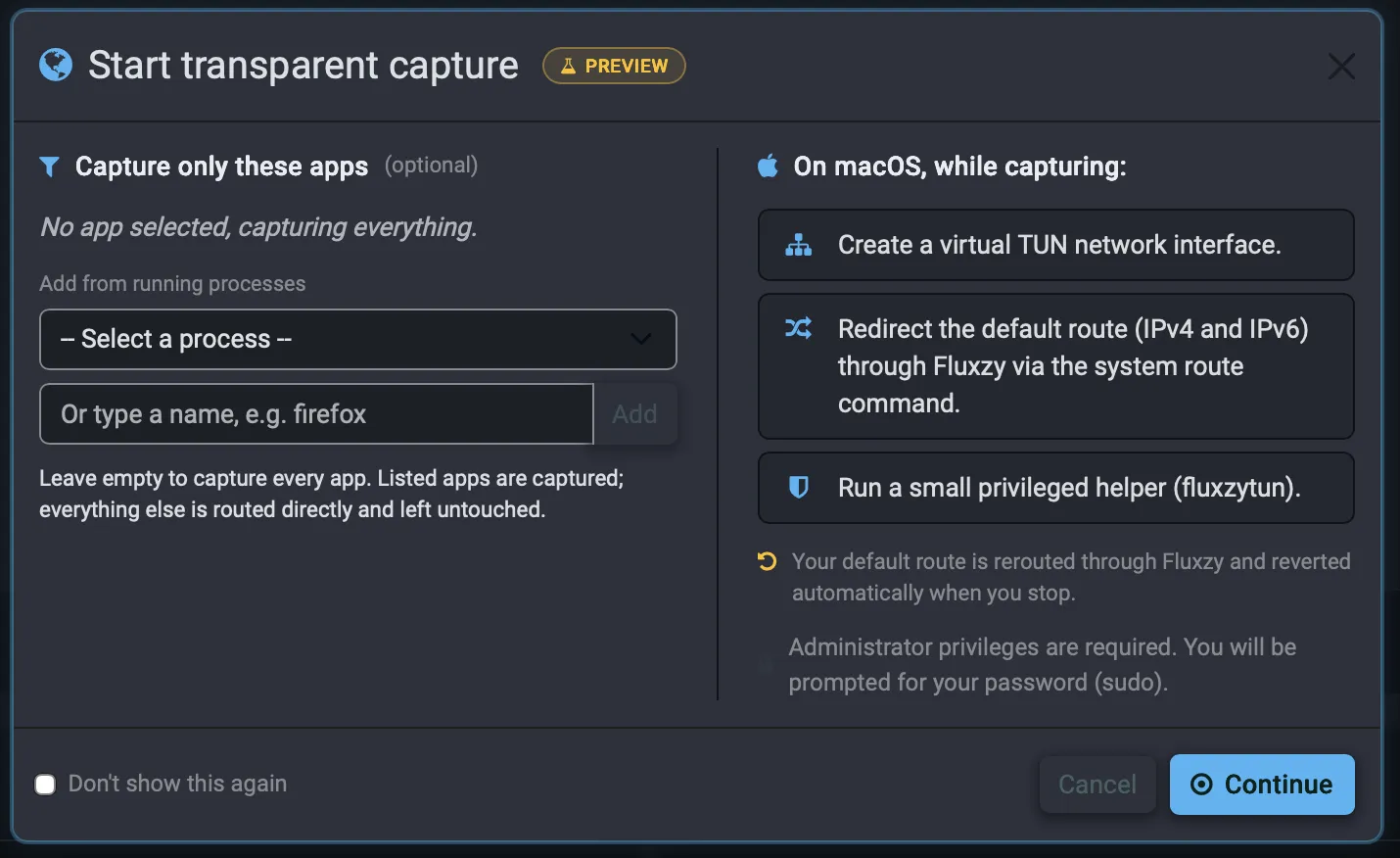
- The default route is hijacked to a virtual TUN adapter. The adapter is created with elevated privileges through a small privileged helper, and from then on the OS hands outbound packets to it instead of the physical interface.
- A tun2socks engine bridges packets to streams. It reads raw IP packets off the TUN device and turns them into TCP connections, reassembles TCP, answers DNS with fake IPs so the original hostnames are preserved, and reads the TLS SNI so targets can be addressed by name.
- Traffic flows into the same Fluxzy.Core proxy engine used in classic mode, over a loopback connection. The engine records, decrypts, inspects, alters and replays exactly as it always has.
- The proxy's own upstream sockets bypass the tunnel, pinned to the physical interface so Fluxzy's outbound traffic is not captured again in a loop. Upstream DNS is resolved off-tunnel for the same reason.
- Responses travel the reverse path back through the proxy, the TUN adapter and the OS stack to the originating application, which only ever sees a normal network connection.
The interception engine that records, decrypts and replays traffic is Fluxzy.Core, which is open source. It is the same engine used in classic proxy mode. Proxyless capture changes how traffic reaches the engine, not what happens once it arrives.
Capture only the apps you care about
Proxyless capture is global by default, but it does not have to be. The start dialog includes an optional Capture only these apps panel: pick a program from the list of running processes, or type its name (for example firefox), and add it. Leave the list empty to capture everything, or add one or more processes and Fluxzy captures only those while everything else on the machine is routed directly and left untouched.
Because the filter keys on the process itself rather than on a proxy setting the app has to honor, it works even when the application has no proxy support at all. That turns several awkward situations into routine ones:
- Debug an app without altering it. Desktop clients, Electron apps, games and device emulators often reach their backends over their own network stack and ignore the system proxy. Add the process and you see its API calls, decrypted, with no SDK to embed and no change to the app.
- Inspect a CLI tool, script or SDK. Command line tools that do not read
HTTP_PROXY, or that bundle their own TLS stack, are captured by naming their process (for example apython,nodeordotnetprocess). It is a quick way to see exactly what an undocumented or third-party API a tool calls. - Cut the noise on a busy machine. A global capture also records OS telemetry, update checkers and background services. Narrowing to a single process keeps the session focused.
- Leave the rest of the machine alone. Only the listed processes are routed through Fluxzy. VPN, conferencing and other work keep flowing directly, which makes it safe to capture one application on a workstation you are actively using.
IPv6 and the bypass list
Proxyless capture is configured in Global Settings, under the transparent proxy section.
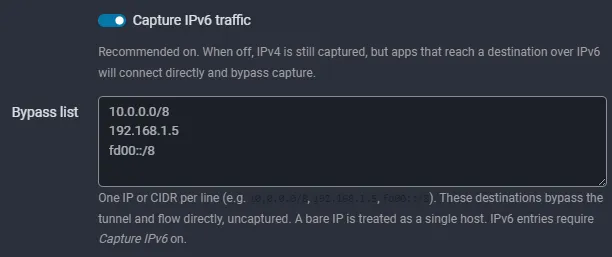
- Capture IPv6 traffic (recommended on): when off, IPv4 is still captured, but apps that reach a destination over IPv6 connect directly and bypass capture.
- Bypass list (split tunnel): one IP or CIDR per line (for example
10.0.0.0/8,192.168.1.5,fd00::/8). These destinations skip the tunnel and flow directly, uncaptured. A bare IP is treated as a single host, and IPv6 entries require Capture IPv6 to be on.
Safe by design
Rerouting a machine's network is a significant operation, and proxyless capture is built to handle it carefully:
- The network changes apply only while a capture is running. Stopping the capture, or closing the application, restores networking automatically.
- The redirection is designed to recover connectivity on its own even if the application is force-closed, so it does not strand the connection.
- Setting up the virtual adapter requires elevated rights, so Fluxzy uses a small dedicated privileged helper for that step while the main application keeps running unprivileged. A summary of the changes and a single authorization prompt are shown before anything is applied.
Availability and limits
Proxyless capture is currently in preview, and behavior and platform support continue to evolve.
- It runs on Windows, macOS and Linux, each using its own native networking facilities under the hood while the capture experience stays the same.
- It captures TCP traffic. UDP and HTTP/3 (QUIC) are not captured, so QUIC clients fall back to TCP.
- If the transparent option is unavailable in your build, use the system proxy mode instead.
Get started
- Install and trust the Fluxzy root certificate (decryption needs it in both modes).
- Switch the capture mode to transparent in the title bar.
- Start the capture and approve the elevation prompt. Optionally, add one or more processes to capture only those.
For the full step by step, including certificate trust and verifying decryption, see Capture and decrypt HTTPS traffic. For the background story and design notes, read Transparent capture: intercept traffic with no proxy configuration.