Decode JWT bearer tokens
A JSON Web Token (JWT) is the string an API client sends in the Authorization: Bearer ... header to prove who it is. The token looks opaque, but it is not encrypted: it is three Base64Url-encoded parts (header.payload.signature) joined by dots. When you are debugging an API, you constantly need to read what is inside: which user, which scopes, and whether the token is still valid.
Fluxzy does this for you. Whenever a captured request carries a Bearer JWT, Fluxzy adds a JWT view to the exchange that decodes the token and lays out its claims, header and payload. There is no copy-pasting into an online decoder, and no risk of leaking a live token to a third-party website.
TL;DR. Select a request that sends an
Authorization: BearerJWT, then open the JWT tab in the request panel. Fluxzy shows the algorithm, issuer, subject, audience, issued-at and expiry, flags expired tokens in red, and prints the decoded header and payload. It decodes the token; it does not verify the signature.
Platform note. The screenshots are from the Windows app. The JWT view is identical on macOS and Linux.
What you can read from a JWT in Fluxzy
For any Bearer JWT in a captured request, the JWT view surfaces:
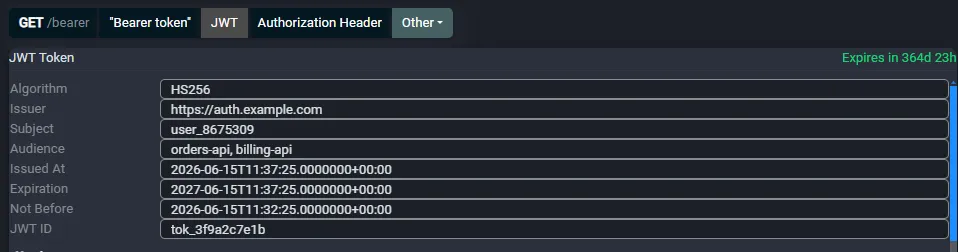
- The standard claims as a table: Algorithm, Issuer, Subject, Audience, Issued At, Expiration, Not Before and JWT ID (only the claims actually present in the token are shown).
- An expiry badge that is green when the token is still valid and red when it has expired.
- The decoded Header and Payload as pretty-printed JSON.
- The raw Signature and the full Raw Token.
Because decoding happens locally, your tokens never leave your machine, which matters when a token grants real access.
How Fluxzy detects and decodes the token
Fluxzy scans each captured request for an Authorization header whose value starts with Bearer (case-insensitive). It takes the token after Bearer , splits it into its three parts, and Base64Url-decodes the header and payload. A few things follow from how this works:
- It is request-side only. Tokens in cookies, query strings, response headers, or non-standard header names are not picked up by the JWT view.
- The token must be a standard JWS with three dot-separated parts. An encrypted JWE (five parts) cannot be decoded this way.
- Time claims (
exp,iat,nbf) are read as numeric Unix seconds and shown as readable dates.
Step 1: Capture a request that carries a Bearer token
Fluxzy listens on its proxy port as soon as it starts (shown in the status bar, commonly 0.0.0.0:44344), so you can record a single request without starting a system-wide capture. Send any request that includes a Bearer JWT:
curl -x http://127.0.0.1:44344 -k \
  "https://httpbin.org/bearer" \
  -H "Authorization: Bearer <your-jwt>"
The -x flag routes curl through Fluxzy and -k accepts the Fluxzy certificate so HTTPS is decrypted. The request appears in the exchange list right away. If you have not captured anything yet, see Capturing HTTPS traffic.
Step 2: Open the JWT view
Click the request in the list to open its details, then look at the format buttons on the request side. When a Bearer JWT is present, Fluxzy adds a JWT button (next to Bearer token, which shows the raw, still-encoded value):

The Bearer token view shows the opaque token exactly as it was sent. Click JWT to decode it.
Read the decoded claims
The JWT view lists the standard claims in a table. In this example the token is issued by https://auth.example.com for subject user_8675309, scoped to the orders-api and billing-api audiences, and signed with HS256:
Each value is in a read-only field you can select and copy. Only the claims present in the token appear, so a minimal token shows fewer rows.
Spot expired and not-yet-valid tokens
The badge at the top right tells you the token's validity at a glance:
- Green "Expires in ..." means the token is still valid, and shows how long is left.
- Red "Expired ... ago" means it is past its
exptime.
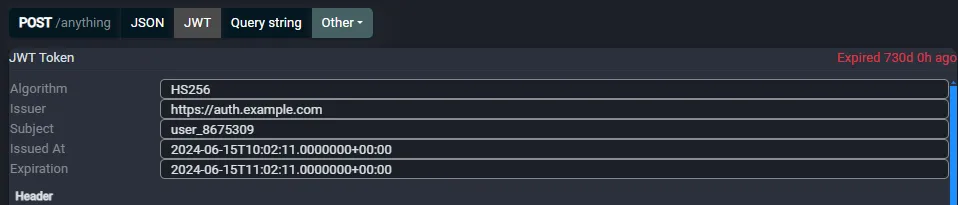
The badge is computed against your computer's current clock. A token you captured a while ago will read as expired now even though it was valid at capture time, which is expected. If the token has a nbf (not before) claim, the Not Before row tells you the earliest time it becomes usable.
Inspect the header and payload
Below the claims table, Fluxzy prints the decoded Header and Payload as formatted JSON, plus the Signature and the Raw Token. The payload is the full set of claims exactly as the issuer sent them, including any custom ones:
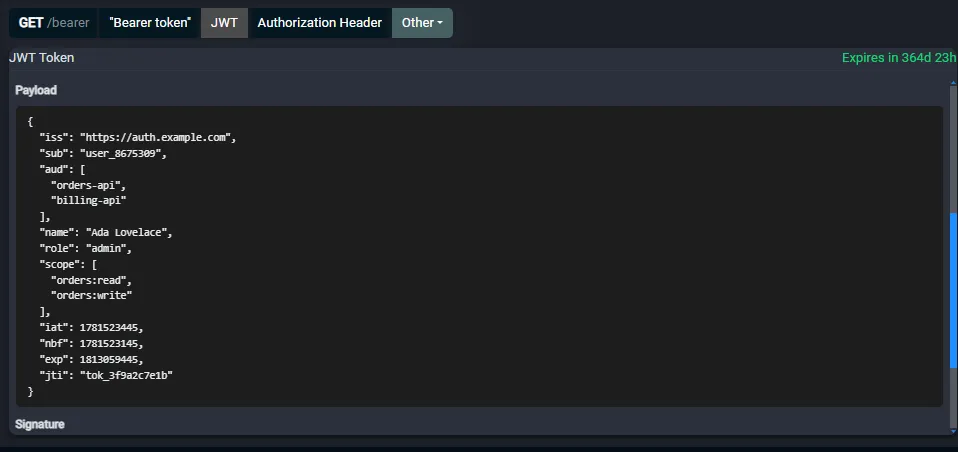
This is useful when a token carries non-standard claims (roles, tenant ids, feature flags) that do not appear in the summary table. The Header block shows the algorithm and key id (kid), which help you match the token to the signing key your service expects.
Decode is not verify: what Fluxzy does and does not check
This is the most important thing to understand about the JWT view:
- Fluxzy decodes the token (reads the header and payload) and shows the signature. It does not verify the signature against any key, and it does not enforce
expornbf. A token shown here is a readable token, not a trusted one. - A JWT payload is not secret. Anyone who can see the token can Base64Url-decode it, which is exactly what this view does. Never put secrets in a JWT payload.
- The expiry badge is informational. The server that receives the token is what actually accepts or rejects it.
In context
JWT decoding is part of the same exchange detail view that decodes JSON, gRPC and Protobuf and LLM API payloads. Combine it with filters to isolate authenticated requests, or with breakpoints to swap a token before a request continues.
Frequently asked questions
Does Fluxzy validate the JWT signature?
No. The JWT view decodes the token and displays its signature, but it does not check the signature against a key, and it does not validate exp or nbf. Use it to read a token, not to trust it.
Where does Fluxzy look for the token?
In the request Authorization header, on values that start with Bearer . Tokens sent in cookies, query strings, response headers, or other headers are not decoded by this view.
Why does my valid token show as expired?
The expiry badge compares the token's exp claim to your computer's current time. A token captured earlier can read as expired now. That is expected: the badge reflects validity at the moment you are looking, not at capture time.
Can it decode an encrypted token (JWE)?
No. The view decodes standard signed tokens (JWS), which have three parts. An encrypted JWE has five parts and cannot be read without the decryption key.
Are my tokens sent anywhere?
No. Decoding is fully offline. Each claim sits in a selectable read-only field, and the full encoded token is shown in both the Raw Token block and the Bearer token view. Nothing is sent to any server.
How do I change or replay a request with a different token?
The JWT view is read-only. To send a request with a modified token, use a rule (for example Inject Bearer Auth) or pause the request at a breakpoint and edit the header before it is forwarded.
Next steps
- Read the full exchange details guide to inspect headers, JSON bodies, connection details and timings alongside the JWT.
- Export as a cURL command (right-click a row) to reproduce an authenticated request from the terminal.
- Use filters on the Request Header field to find every request that carries an
Authorizationheader.