Mock response body
A mock response answers a request with a response you define, without ever reaching the real server. Fluxzy does this with the Mock response action: when a request matches your filter, Fluxzy replies with your status code, headers and body, and never forwards the request upstream.
This is invaluable when you want to build a frontend before the API exists, reproduce an error your code rarely sees, or return deterministic data for a demo or test. No backend, no code, fully offline.
TL;DR. Open rule management, click Add rule, choose Mock response, set a status code, pick a content type, type or load a body, then scope it with Apply When. Matching requests now get your response instead of the server's.
Platform note. Screenshots are from the Windows app. The workflow is identical on macOS and Linux.
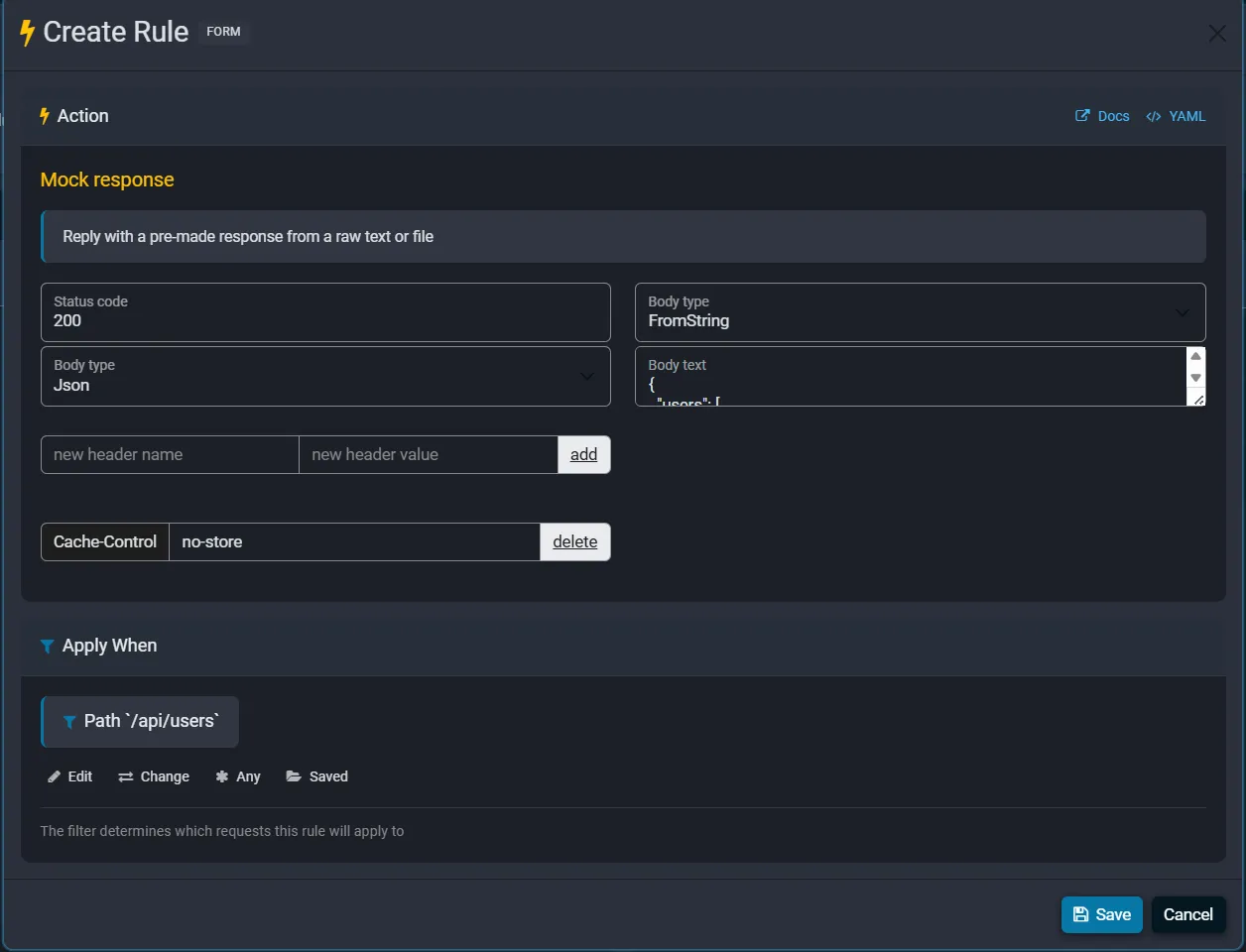
The Mock response action is a rule built on the mock response directive, so it is created and scoped by a filter like any other rule. This guide focuses on the mock-specific parts.
What is a mock response?
Normally Fluxzy is a pass-through proxy: it records and optionally edits traffic, but the response still comes from the origin server. A mock replaces the response. Fluxzy intercepts the matching request and answers it directly with the body you provide. The request is never sent to the real server, so the mock works even if that server is down, unbuilt, or offline.
When to mock a response
- Frontend before backend. Develop against an endpoint that does not exist yet by returning the JSON your UI expects.
- Error and edge-case testing. Force a
500,503or429, or a malformed body, to see how your app handles it on demand. - Deterministic demos and tests. Always return the same payload so a demo or automated test does not depend on a live service.
- Isolating a dependency. Replace one flaky third-party call while the rest of the traffic flows normally.
Create a mock response rule, step by step
1. Open the action picker and choose Mock response
Open rule management in one of the following ways:
- Settings menu > manage rules
- Status bar > active rule
Ctrl+TorCmd+Tfor the search everywhere tool, then typeManage rules
Click Add rule, then search for mock and pick Mock response.
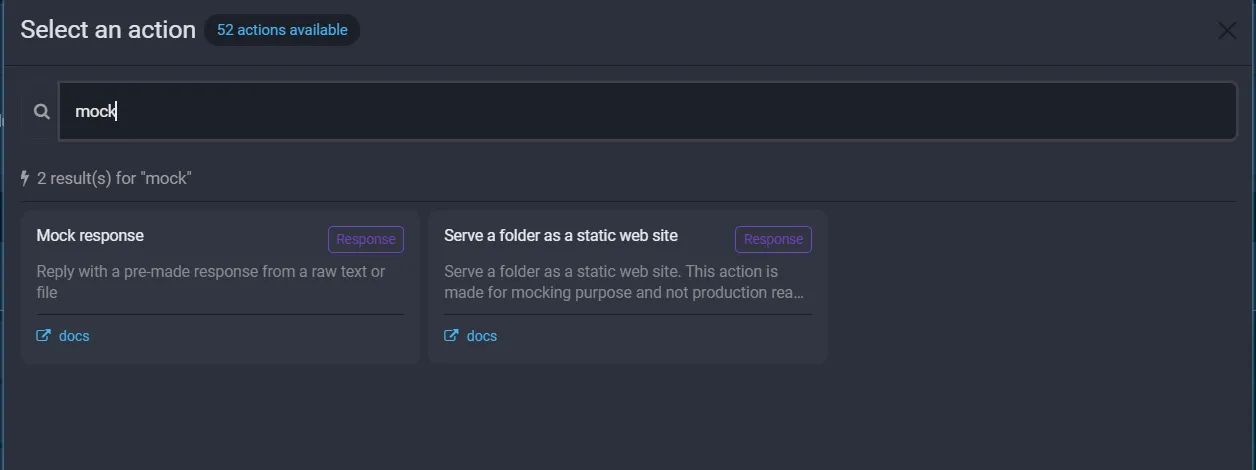
2. Set the status code
Enter the Status code to return, for example 200 for success or 503 for an outage. Any code from 100 to 599 is valid.
3. Choose the content type
The Body type selector on the left (under the status code) sets what kind of content the body is: Json, Html, Text, Xml, Css, JavaScript, Binary, Font or proto. Fluxzy uses it to set the response Content-Type so your client parses the body correctly. Leave it unset if you want Fluxzy to detect the type from the body.
4. Provide the body
The Body type selector on the right (top of the right column) chooses where the body comes from:
- FromString: type or paste the body into the Body text box. Best for JSON, HTML and plain text.
- FromFile: point to a file on disk with browse, or type the path. Best for large payloads, images, or fixtures you keep under version control.
- FromImmediateArray: paste base64-encoded bytes. Best for small inline binary blobs.
Note. Both selectors read "Body type" in the current UI. The left one is the content type; the right one is the body source. They are independent.
5. Add response headers (optional)
To send extra response headers, type a header name and value and click add. Each header appears in a list below, where you can edit the value or delete it.
6. Scope it with Apply When
In Apply When, click Change and pick a filter so the mock hits only the endpoint you want. For a single endpoint, a Path or Full url filter is ideal. Leaving it at Any requests would mock every response, which is rarely what you want. Filters are covered in detail in the rules guide.
7. Save
Click Save. The mock rule appears in the ENABLED column and applies to matching requests captured from then on.
Example 1: Mock a JSON API response
Return a fixed JSON payload for an endpoint that is not ready yet.
Add rule, choose Mock response.
Status code:
200.Content type:
Json.Body source FromString, then paste the JSON into Body text:
{
  "users": [
    { "id": 1, "name": "Ada Lovelace", "role": "admin" },
    { "id": 2, "name": "Alan Turing", "role": "user" }
  ]
}
Optionally add a header, for example
Cache-Control: no-store.Apply When: a Path filter,
StartsWith/api/users.Save.
Any request whose path starts with /api/users now receives your JSON, with no call to the real server.
Example 2: Simulate an error response
Force an error to test how your app degrades.
Add rule, choose Mock response.
Status code:
503.Content type:
Json.Body source FromString, with a small error body:
{
  "error": "service_unavailable",
  "message": "Scheduled maintenance, please retry shortly."
}
Add a
Retry-After: 120header, which clients honour for503.Apply When: scope to the API, for example a Hostname filter
api.example.com.Save.
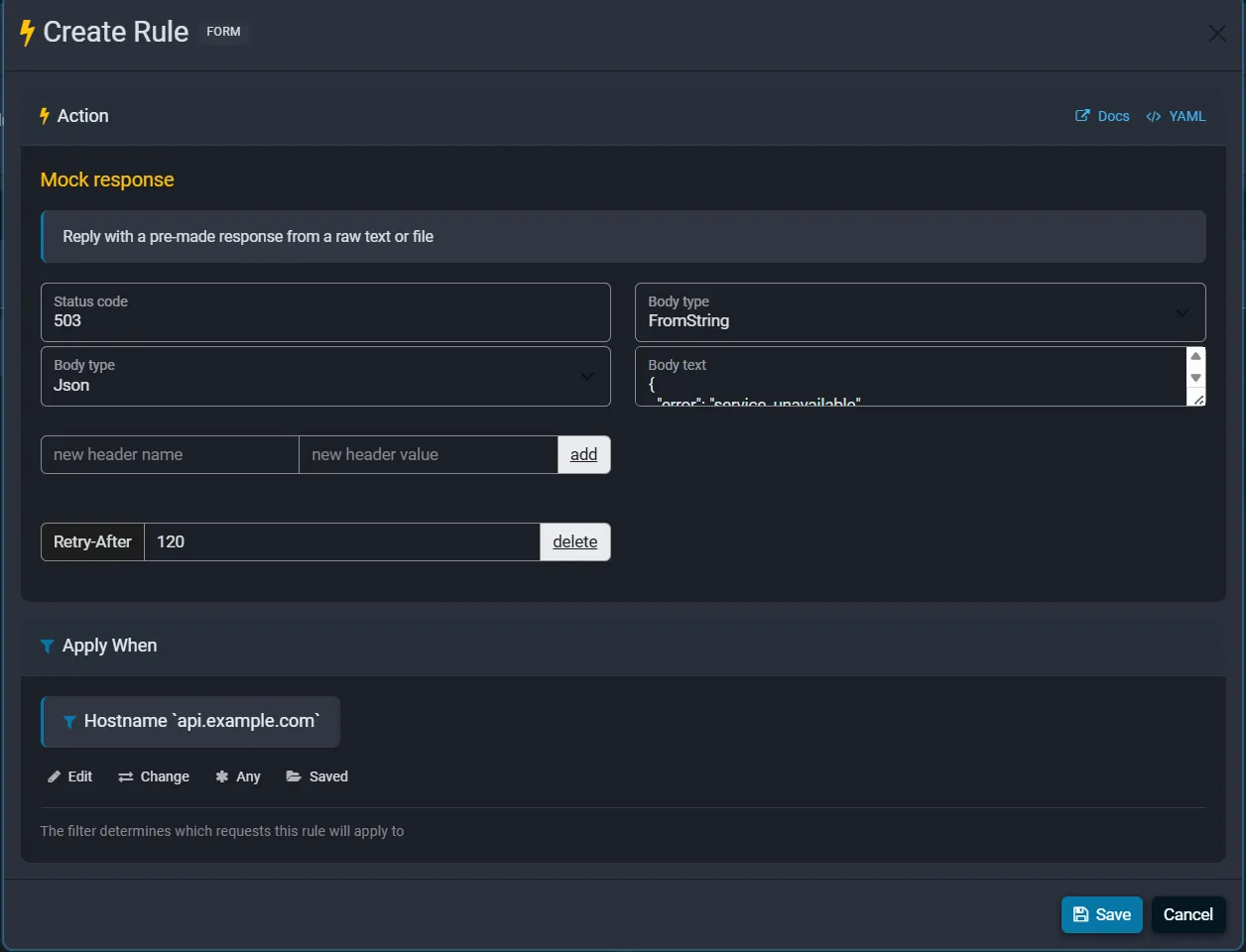
Every call to that host now fails with your 503, so you can verify retries, backoff and error UI without taking the real service down.
Example 3: Serve a mock body from a file
For large or binary payloads, keep the body in a file instead of pasting it inline. This is handy for fixtures you edit separately or keep in version control.
- Add rule, choose Mock response.
- Status code:
200. - Content type: match the file, for example
Jsonfor a JSON fixture, orBinaryfor an image. - Body source FromFile, then browse to the file or type its path, for example
C:\mocks\users.json. - Apply When: scope it, for example Path
StartsWith/api/users. - Save.
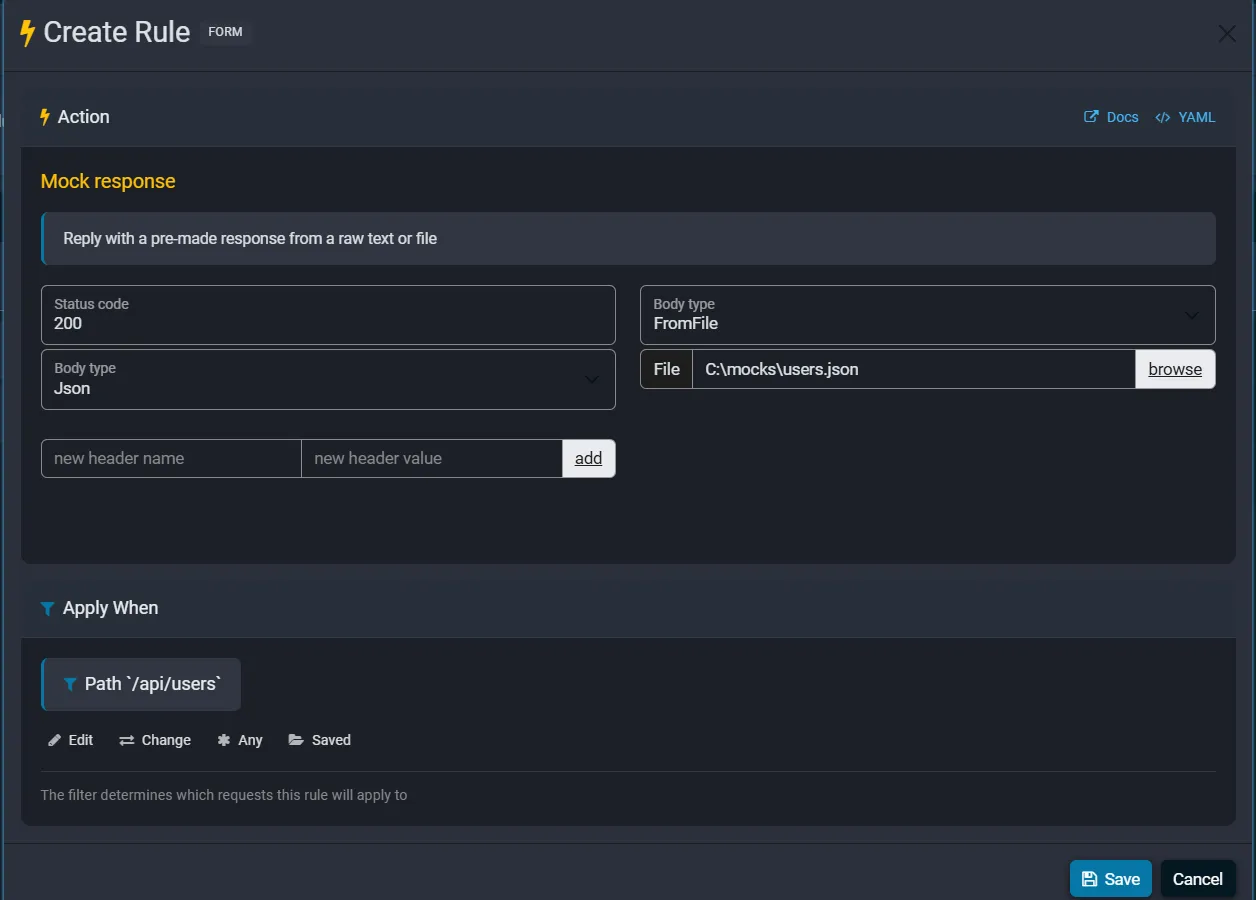
Fluxzy reads the file each time it serves the mock, so editing the file updates the response without touching the rule.
Manage and reuse your mock rules
Mock rules sit in rule management alongside everything else. You can enable or disable them, reorder them, duplicate one as a starting point, and import or export them to share or version a whole mock set.
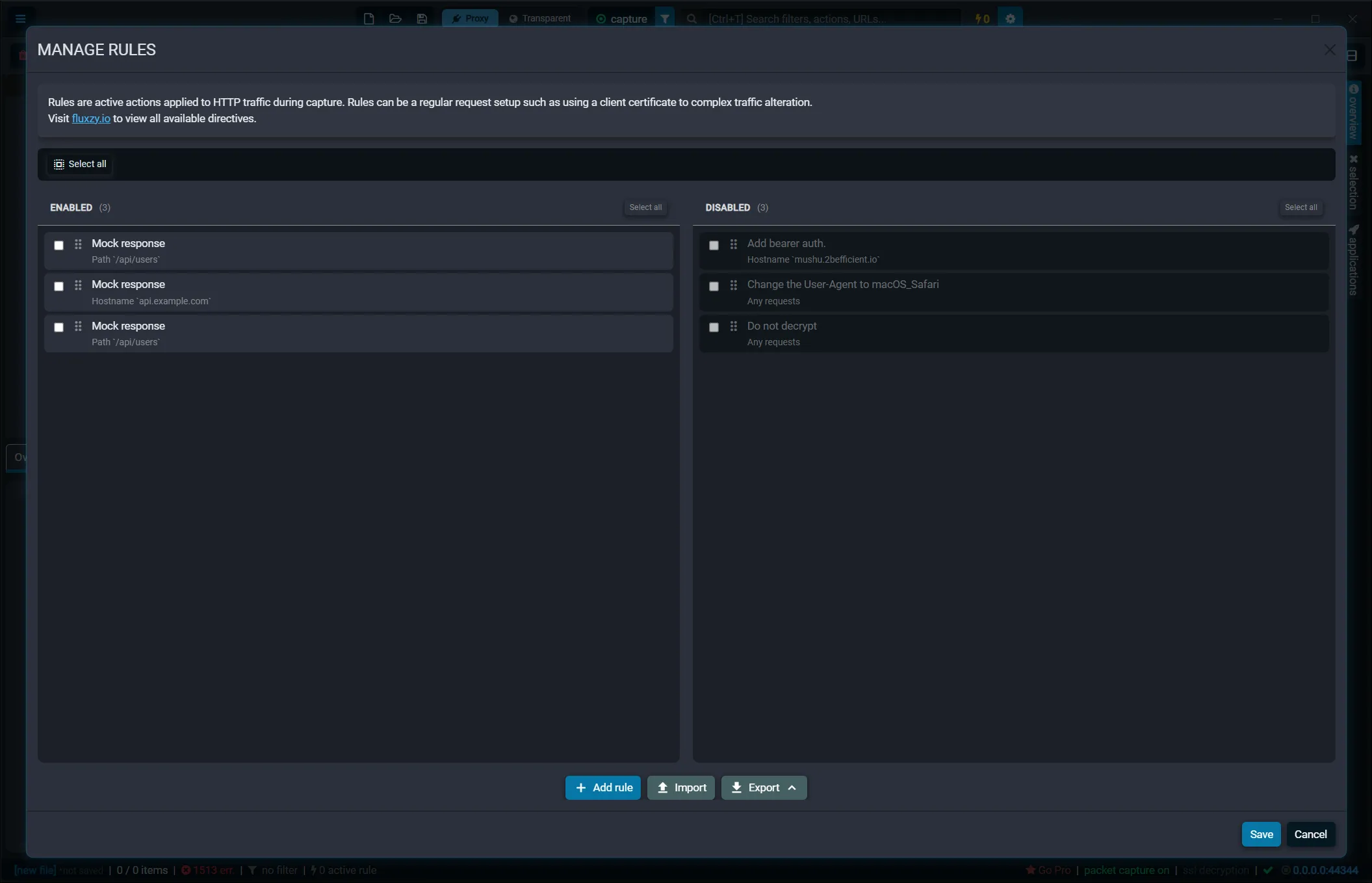
Because each mock is scoped by its own filter, you can stack several: one mocks /api/users, another returns a 503 for a different host, and real traffic flows everywhere else. See the rules guide for enabling, ordering, importing and exporting rules.
Troubleshooting
My mock is not returned
- Confirm the rule is ENABLED, not disabled.
- Check the Apply When filter matches the request. A Path filter includes the query string, so prefer
StartsWithorContainsoverExactwhen the URL carries query parameters. - Mocks apply to traffic captured after the rule is enabled. Re-issue the request.
The client will not parse my JSON
Set the content type to Json so Fluxzy sends Content-Type: application/json. A mismatched content type is the usual cause of a client refusing to parse a correct body.
The body looks empty or wrong
- With FromFile, make sure the path is correct and the file is readable by Fluxzy.
- With FromImmediateArray, the content must be valid base64. Fluxzy rejects invalid base64 on save.
FAQ
Can I mock an API response with Fluxzy?
Yes. Add a Mock response rule with a filter, set the status code, content type and body, and Fluxzy returns that response for every matching request, no backend required.
Does a mock still contact the real server?
No. A matched mock replies directly, so the request is never forwarded. The mock works even if the origin is offline.
Can I mock only one endpoint and let everything else pass through?
Yes. Scope the rule with a Path or Full url filter in Apply When. Only matching requests are mocked; all other traffic flows normally.
Where does the mock body come from?
From a string you type, a base64 array, or a file on disk, so you can serve anything from a small JSON payload to a full binary response.
Can I return binary content such as an image?
Yes. Either choose FromFile and point to the image, or set the body source to FromImmediateArray and paste the base64-encoded bytes. Set the content type to Binary.
Can I use mocking to test error handling?
Yes. Return a 500, 429, 503 or any status code with a custom body to exercise your client's error paths deterministically.
How is this different from serving a folder as a static web site?
Mock response returns one crafted response for matching requests. Serve a folder as a static web site maps a local folder to a host so many paths are served from files at once. Use the folder action when you want to stand up a whole static site rather than a single endpoint.
Next steps
- New to rules? Start with modifying traffic with rules.
- Make sure HTTPS is decrypted first with capturing HTTPS traffic.
- To edit a live response instead of replacing it wholesale, pause the request at a breakpoint.