Comparing exchanges
Fluxzy Desktop includes a built-in diff viewer to compare two HTTP exchanges side by side. This feature is useful for identifying differences between similar requests, comparing responses before and after a change, or debugging API behavior across different environments.
The diff viewer uses Monaco Editor (the same editor that powers VS Code) to provide a familiar and powerful comparison experience.
Opening the diff viewer
To compare two exchanges:
In the exchange table, select exactly two exchanges:
- Click the first exchange to select it
- Hold
Ctrl(orCmdon macOS) and click the second exchange
Once two exchanges are selected, click the diff button in the toolbar

The diff viewer opens in a full-screen modal showing both exchanges side by side.

Diff options
The diff viewer provides several options to customize the comparison:
| Option | Description |
|---|---|
| Include Connection Info | Include connection metadata (IP addresses, TLS info) in the comparison |
| Order Headers | Sort headers alphabetically before comparing, useful when header order varies |
| Exclude Cookies | Remove cookie headers from the comparison to focus on other differences |
| Ignore Headers | Comma-separated list of header names to exclude (e.g., Date, X-Request-Id) |
| Max Body Length | Maximum number of bytes to include from the response body (default: 65536) |

Options are applied automatically as you change them (with a small debounce delay). You can also click Refresh to manually reload the diff.
Understanding the diff view
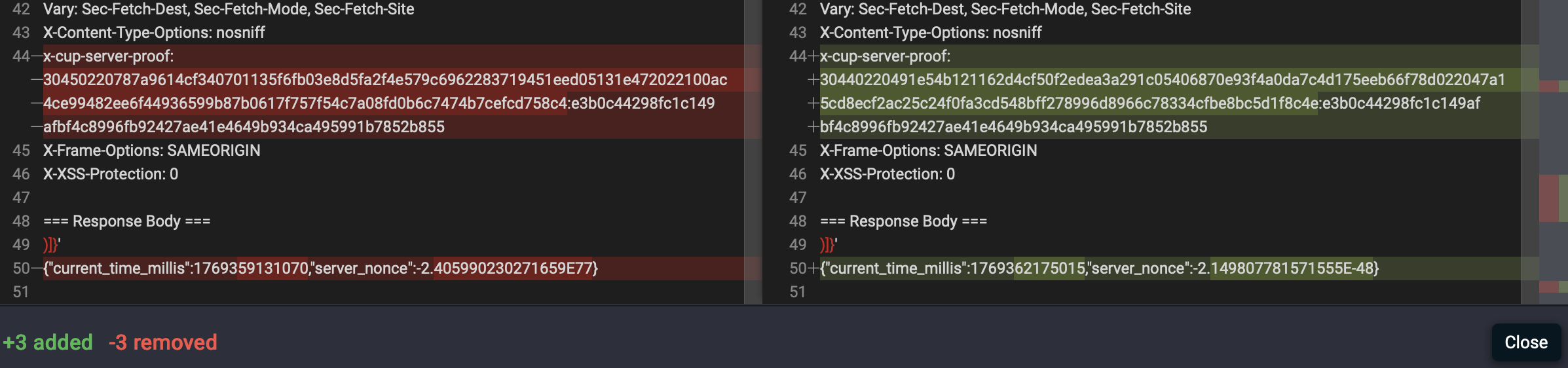
The diff viewer displays:
- Left panel: The first selected exchange (shown as "LEFT")
- Right panel: The second selected exchange (shown as "RIGHT")
- Line highlighting: Added lines are highlighted in green, removed lines in red
- Statistics: The footer shows the count of added and removed lines
Common use cases
Compare request before and after modification
When debugging rule modifications:
- Capture the original request
- Apply your rule changes
- Capture the modified request
- Compare both to verify the changes
Compare responses from different environments
When testing API consistency:
- Capture response from production
- Capture response from staging/development
- Compare to identify differences
Debug inconsistent API behavior
When investigating flaky behavior:
- Capture a successful request/response
- Capture a failing request/response
- Compare to identify what changed
Tips
- Use Order Headers when comparing exchanges where header order is not significant
- Use Ignore Headers to filter out headers that change on every request (like timestamps or request IDs)
- Reduce Max Body Length when comparing large responses to focus on the beginning of the content
- Use
Ctrl+Click(orCmd+Click) to select multiple exchanges efficiently