Let Claude Code debug your HTTP traffic: the Fluxzy MCP server
If you use a coding agent, you know the copy-paste loop. A request fails, you open your HTTP debugger, find the exchange, copy the request headers into the chat, then the body, then the agent asks for the response, so you paste that too, and by the time it answers you have forgotten what you were doing. Half of the context the agent needs lives in the proxy window, and the agent cannot see it.
Fluxzy Desktop now fixes that with a built-in Model Context Protocol (MCP) server. Flip a switch, add one line to your agent's config, and Claude Code, Cursor, VS Code Copilot, Codex or Claude Desktop can read the capture session you have open, live. The agent sees exactly what you see, and it asks Fluxzy for the pieces it needs instead of asking you.
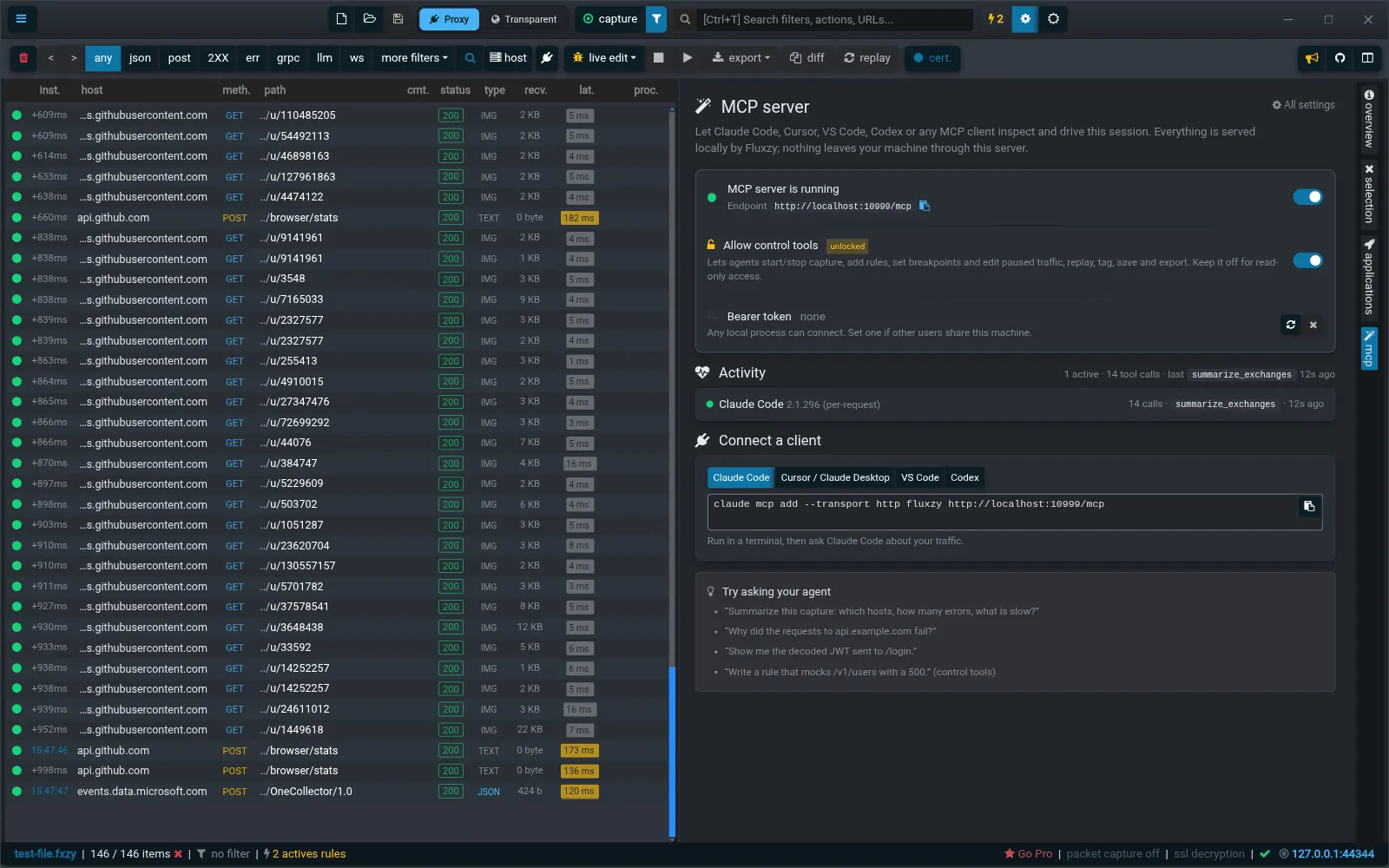
What an MCP server adds to an HTTP debugging proxy
MCP is the open protocol most agents use to talk to tools. A server exposes a set of named tools, the agent decides which ones to call. Fluxzy's server runs inside fluxzyd, the engine that powers the desktop app, and serves http://localhost:{port}/mcp on the same port the app already uses. There is no second process, no cloud relay, no account.
The tools map to what you would do by hand in the app:
- search and list exchanges with the same filters as the UI (host, method, status, content type, "only errors", free text, time window) or a raw Fluxzy filter in JSON
- read one exchange in full: headers, timings, connection and TLS details, decoded body, formatted views (JSON, JWT, forms, gRPC, LLM API calls)
- summarize a whole session in one call: totals, per-host table with p50 and p95, slowest and largest exchanges, errors
- wait for traffic to arrive after the agent (or you) triggers something, instead of polling
- analyze the packet capture when raw capture was on: TCP handshake, retransmissions, TLS handshake timeline, and a correlation that tells whether an exchange was slow because of the network, the server or a shared connection
- change things, behind a second switch: capture on and off, add and validate rules, set breakpoints and edit paused traffic, replay, tag, save and export
- ask about Fluxzy itself: a help tool answers questions on the product from the same knowledge base as the docs
Each tool returns compact JSON meant for a model, not a browser: nulls dropped, long URLs trimmed, bodies paged. That matters more than it sounds. An agent that pulls a 4 MB response into its context is an agent that stops being useful.
Three things it is good at
The three transcripts below are real. They come from Claude Code talking to a Fluxzy instance with a small GitHub browsing capture open (146 exchanges, the sample file that ships with the test suite). Only the prompts were written by hand.
"What is in this session?"
Prompt: give me a short overview of the capture session currently open: how many exchanges, which hosts dominate, how many errors, and what is slow.
The open session is the saved sample file test-file.fxzy, a short GitHub browsing capture. Capture is currently off.
| Metric | Value |
|---|---|
| Exchanges | 146 over 38 connections, 8 hosts |
| Errors | 0 (every response is 2xx) |
| Duration p50 / p95 | 26 ms / 680 ms |
Dominant hosts. Avatar images from avatars.githubusercontent.com make up 105 of the 146 exchanges and are fast. github.com itself accounts for 26 exchanges but most of the bytes, and api.github.com for 8.
What is slow. Everything over a second is on github.com, and the wait is server-side latency rather than transfer: the home page GET (exchange 134) took about 1.5 s, two GraphQL POSTs for suggested navigation (exchanges 172 and 263) took about 1.4 s each, the "for you" feed pages (154 and 246) took 1 to 1.2 s and are also the largest responses at roughly 96 KB.
That answer took one tool call, fluxzy_summarize_exchanges. The agent did not page through 146 rows; it asked for the aggregate and got the ids of the interesting exchanges for free. Try doing that by hand in under a minute.
"Why is this request slow?"
Prompt: exchange 172 looks slow. Explain where the time went (connection setup, waiting for the server, transfer) and what I could do about it.
Exchange 172 is a POST to github.com's GraphQL endpoint GetSuggestedNavigationDestinations, 200 OK, total about 1469 ms. Almost all of it is the server thinking.
| Phase | Time |
|---|---|
| DNS / TCP / TLS (connection 41, reused) | 2 / 22 / 78 ms, paid earlier, not by this request |
| Sending request (13.5 KB, 2 segments) | 3.4 ms |
| Waiting for first byte | 1458 ms |
| Receiving response (7.5 KB gzip, 6 segments) | 9.5 ms |
The packet capture settles the cause. GitHub acked the request 21 ms after the last byte, matching the 18 ms handshake round trip, then sent nothing for 1437 ms. No retransmissions, zero-window events or duplicate acks, and no other exchange shared the connection. GitHub's own header agrees: echoes-metrics: TTFB=1459.
What you can do: nothing on the network side helps, connection setup and transfer together cost under 15 ms. Reduce the request (an 11.7 KB multipart body for a navigation suggestion query is large). Avoid blocking on it. Report it upstream if reproducible: the delay is inside GitHub's application tier.
This is the one I like most. The agent read the exchange timings, then went to the raw packet capture through fluxzy_pcap_correlate_exchange and ruled out packet loss and connection sharing before blaming the server. It even found the server's own TTFB header to cross-check. Fluxzy has had pcap-level capture for years; what was missing was something that reads it for you.
"Mock this endpoint"
Prompt: write a Fluxzy rule that mocks POST requests to github.com/_graphql with a 500 response and a small JSON body, validate it, then add it to the current session.
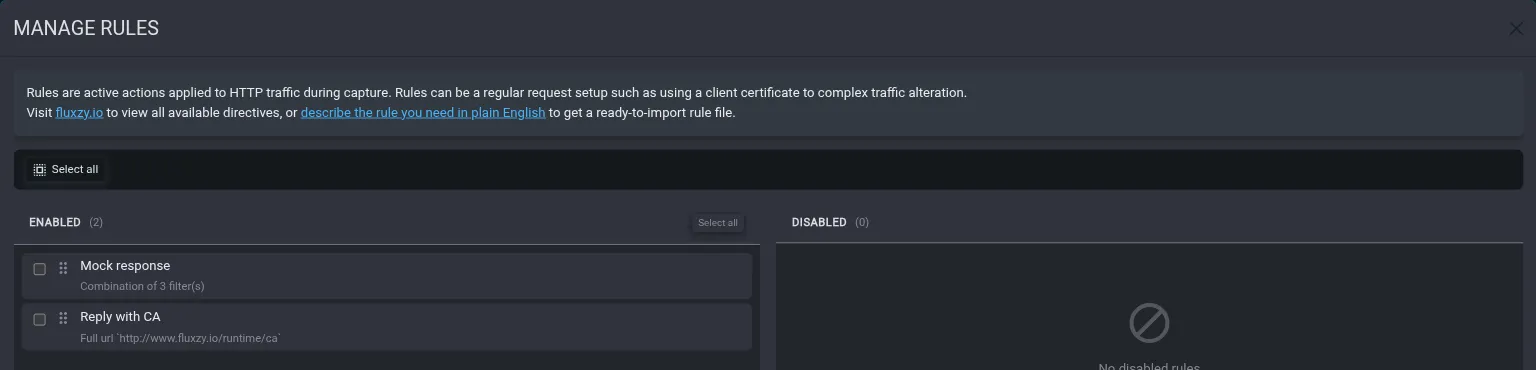
The rule validated cleanly and is now added and enabled in the current session.
filter:
  typeKind: FilterCollection
  operation: And
  children:
    - typeKind: HostFilter
      pattern: github.com
      operation: Exact
    - typeKind: MethodFilter
      pattern: POST
      operation: Exact
    - typeKind: PathFilter
      pattern: /_graphql
      operation: StartsWith
action:
  typeKind: MockedResponseAction
  response:
    statusCode: 500
    headers:
      - name: Content-Type
        value: application/json
    body:
      origin: FromString
      type: Json
      text: '{"error":"simulated outage"}'
Rule list confirms it is enabled at order 1. Note that capture is currently off in the app, so the mock only fires once capture is turned on.
The agent looked up the filter and action catalog (fluxzy_describe_filters, fluxzy_describe_actions), ran the YAML through fluxzy_validate_rules, and only then called fluxzy_add_rules. The rule shows up in the app like any other, and you can edit or disable it from there.
Set it up in two minutes
- Open Fluxzy Desktop and click the mcp tab in the vertical bar on the right (next to overview, selection and applications).
- Flip MCP server on. It applies immediately, no restart.
- Pick your client in Connect a client and copy the snippet.
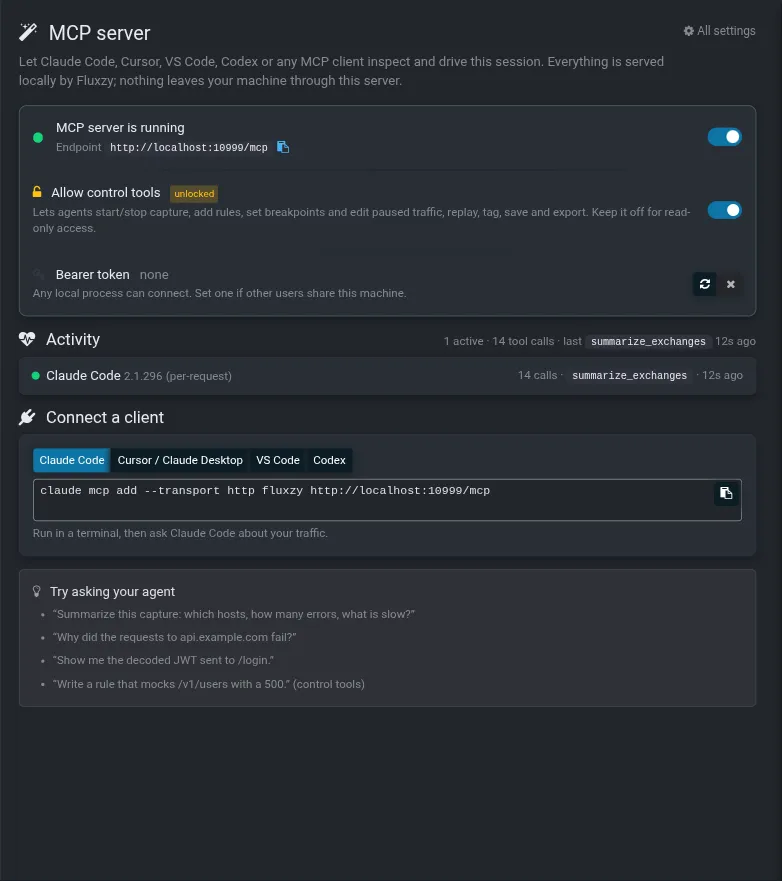
For Claude Code it is one command, run in any terminal:
claude mcp add --transport http fluxzy http://localhost:10985/mcp
Cursor and Claude Desktop take a mcpServers JSON entry, VS Code a .vscode/mcp.json with a servers.fluxzy entry of type http, Codex a [mcp_servers.fluxzy] table in ~/.codex/config.toml. The panel generates all four with the right port, and with the Authorization header already filled in if you set a token.

The same panel shows who is connected and what they are doing: each client with its name and version, the number of tool calls, the last tool called and when. If an agent tries a control tool while the control switch is off, the refused call is counted there with a hint, so you are never left guessing why the agent said it "could not" do something.
Everything is also in Settings > AI Agents (MCP) if you prefer the dialog.
Read tier, control tier, and what leaves your machine
Enabling the server unlocks the read tools only. The agent can look, not touch. Allow control tools is a second switch for the mutating tools: capture on and off, rules, breakpoints and live edit of paused traffic, replay, tags and comments, save and export, launching a browser through the proxy. A control tool called while that switch is off does not fail silently; it returns an error that tells the agent what to ask you.
Every tool that is not marked read-only is gated by construction, so a tool added tomorrow is protected by the same filter. On top of that:
- the endpoint only binds to localhost
- browser origins other than local ones are rejected, which is the DNS-rebinding protection the MCP spec asks for
- an optional bearer token turns the endpoint into "clients must prove they are yours", useful on a shared machine
- while the switch is off, the endpoint answers 503 and nothing is reachable
The honest sentence about privacy: Fluxzy itself sends nothing anywhere. Your captured traffic stays on your machine, same as before. But the agent you connect has its own model provider, and whatever the agent decides to read from Fluxzy ends up in that provider's context. If a session contains production tokens or customer data, do not point a cloud agent at it, or at least keep the control tier off and let the agent work on a filtered, saved copy. The same rule applies to pasting into a chat window; the MCP server just makes it faster.
Getting better answers
A few things we learned while building this:
- Start with status. The agent should call
fluxzy_get_statusfirst; it tells it whether capture is on, how many exchanges exist and whether control tools are unlocked. The server's instructions say so, so most agents do it on their own. - Summarize before listing. "What is in this session" is one call to
fluxzy_summarize_exchanges. Paging throughfluxzy_list_exchangesis for finding specific candidates, with filters. - Use the wait tools. After "launch Chrome through the proxy" or "replay exchange 42",
fluxzy_wait_for_exchanges(after_id)returns the moment the new traffic lands. No sleeping, no polling. - Ready-made prompts. The server ships
fluxzy_debug_slow_request,fluxzy_explain_failure,fluxzy_write_ruleandfluxzy_session_overviewas MCP prompts. In Claude Code they show up as slash commands under the server name. - Turn raw capture on before reproducing a slowness issue. The network-level verdict in the second transcript only exists because the packets were recorded.
Frequently asked questions
Which agents work with the Fluxzy MCP server? Any MCP client that supports the Streamable HTTP transport: Claude Code, Cursor, VS Code with GitHub Copilot, OpenAI Codex CLI, Claude Desktop, and most others. Fluxzy serves both the session-based handshake and the newer session-less protocol revision on the same endpoint.
Does it work with the CLI or only the desktop app? It is part of Fluxzy Desktop. The desktop app is free for individuals, so is the MCP server; there is no separate edition or feature gate.
Can the agent change my traffic? Only if you turn on "Allow control tools". With the default read tier it can list, search and read, nothing else.
Is my traffic sent to Fluxzy or to the model provider? Never to Fluxzy. What the agent reads goes to the agent's own model provider, like anything else the agent reads on your machine. Keep sensitive sessions away from cloud agents.
The port is not 10985, where do I find the URL?
The mcp panel shows the exact endpoint for the running instance. Fluxzy also writes an mcp.json file in its data directory with the live URL and the Claude Code command.
The takeaway
An HTTP debugger holds the ground truth about what your code actually sent and received. Until now that truth was locked behind a window your agent could not read. With the MCP server, "why did this fail", "what is slow here" and "mock that endpoint" become one sentence each, and the answers come from the real bytes on the wire, not from the agent's guess about what the server probably returned.
It ships with Fluxzy Desktop. Download it, open the mcp tab, and ask your agent the question you were about to copy-paste.