Fluxzy Desktop 2.6: security insights for your captured HTTP traffic
Most web security mistakes are not hidden. A session cookie without HttpOnly, a token in a query string, a login page without HSTS: all of it is written in plain text in the traffic, in headers that nobody reads because there are four hundred of them.
You already have that traffic open in your HTTP debugger. So Fluxzy Desktop 2.6 reads it for you. The new security insights go through every exchange you capture, point out the bad practices they can see, and tell you how to fix each one. It runs on your machine, it sends nothing, and it is free.
Two other changes are worth your attention in this release. On macOS, system-wide capture no longer asks for your password every time. And the local API of Fluxzy is now closed to web pages and to other programs on your machine.
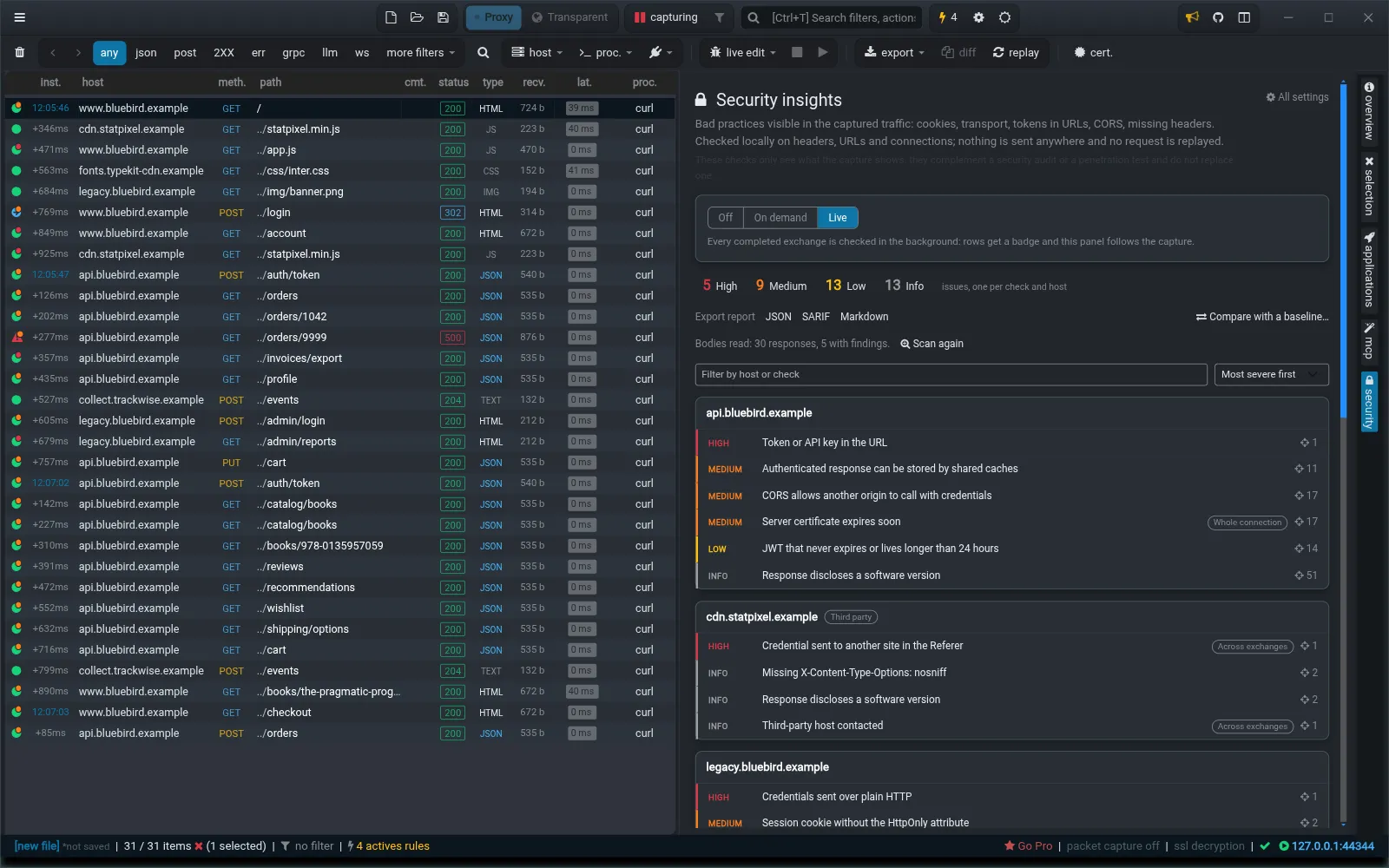
The screenshots in this post come from a small demo bookshop we wrote with the usual mistakes in it. Any resemblance to a real backend is, sadly, not a coincidence.
What security insights are
Security insights are passive security checks on captured HTTP traffic. Fluxzy looks at what went through the proxy: request and response headers, URLs, cookies, the TLS connection and, when you ask, response bodies. It never replays a request, never sends a probe and never contacts the server on its own.
That makes it different from a vulnerability scanner. A scanner attacks an application to see what breaks. Security insights only read what your own browsing or your own test run produced. You can leave them on while you debug something else, and you can point them at production traffic without asking anyone for permission.
It also means they have limits. They see what the capture shows and nothing more. They complement a security audit or a penetration test, they do not replace one. The app says so too.
What you get in practice:
- a small severity badge on the rows of the exchange list that have a finding
- a Security side panel with the whole session, grouped by host, then by check
- a Security tab on each exchange, with the evidence, the reason and the fix
- reports in JSON, SARIF and Markdown, and a pass or fail gate for scripts
What the checks look for
There are 32 checks in this release. Each has a stable identifier such as FXZ-COOKIE-002, a severity (High, Medium, Low or Info), an explanation, a fix and, where it applies, a CWE reference and a link to the documentation.
| Area | What gets flagged |
|---|---|
| Transport | Credentials or form data sent over plain HTTP, HTTPS pages without Strict-Transport-Security, HSTS with a short max-age |
| TLS | Obsolete TLS version, weak cipher suite, server certificate close to expiry |
| Cookies | Missing Secure, session cookie without HttpOnly, missing SameSite, SameSite=None without Secure, cookie scoped to a parent domain |
| Secrets in URLs | Tokens, API keys and passwords in the query string |
| JWT | alg: none, tokens that never expire or live longer than 24 hours |
| CORS | Credentials allowed for any origin, origin reflected back with credentials |
| Browser protections | Missing Content-Security-Policy, unsafe script policy, missing X-Content-Type-Options: nosniff, page that can be framed by any site |
| Information leaks | Software version banners, authenticated responses that shared caches may store |
| Across exchanges | Same credential sent to several sites, token leaked to another site in the Referer, session cookie not renewed at sign-in, inventory of third-party hosts |
| Response bodies | Private keys and provider credentials (AWS, GitHub, Slack, Stripe), stack traces, third-party scripts without integrity, mixed content |
Here is what the panel shows for the storefront of the demo shop:
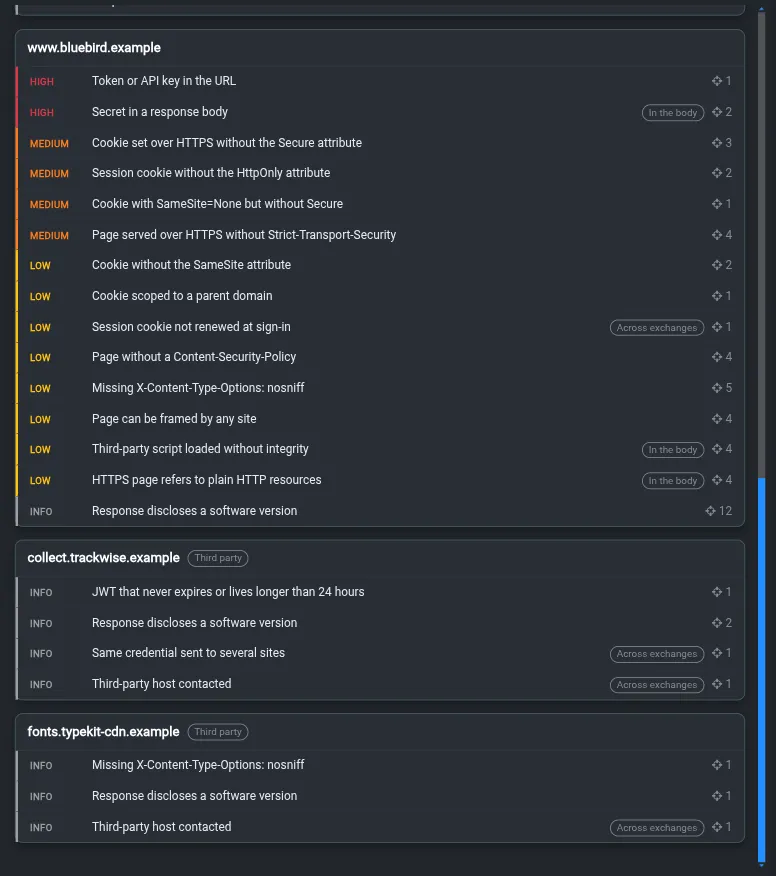
A few things in that screenshot are worth explaining.
One line per problem, not per request. A missing header shows up on every page of a site. Fluxzy reports it once per host and gives you the count on the right. Click the count and the exchange list is filtered to the exchanges concerned.
Findings that need more than one request. Some problems cannot be seen by looking at a single exchange. A bearer token that is sent to your API and also to an analytics endpoint. A session identifier in a page URL that ends up in the Referer of a third-party script. A session cookie that keeps the same value before and after sign-in, which is how session fixation starts. These are tagged Across exchanges. Fluxzy only keeps hashes and host names to compare them, never the secrets themselves.
Whole connection. An obsolete TLS version or a certificate that expires in twelve days is true for every exchange on that connection. Badging all the rows would hide the rows that have a problem of their own, so these findings are shown once per host.
Third party. Tell Fluxzy which hosts are yours in Settings > Security insights (for example *.example.com). Findings on any other host are marked "Third party" and capped at the Info level. You cannot fix the headers of someone else's CDN, so they should not drown your own findings.
Every finding comes with the evidence and the fix
Open an exchange and go to its Security tab. Each finding shows the header or parameter it comes from, why it matters, and what to change.
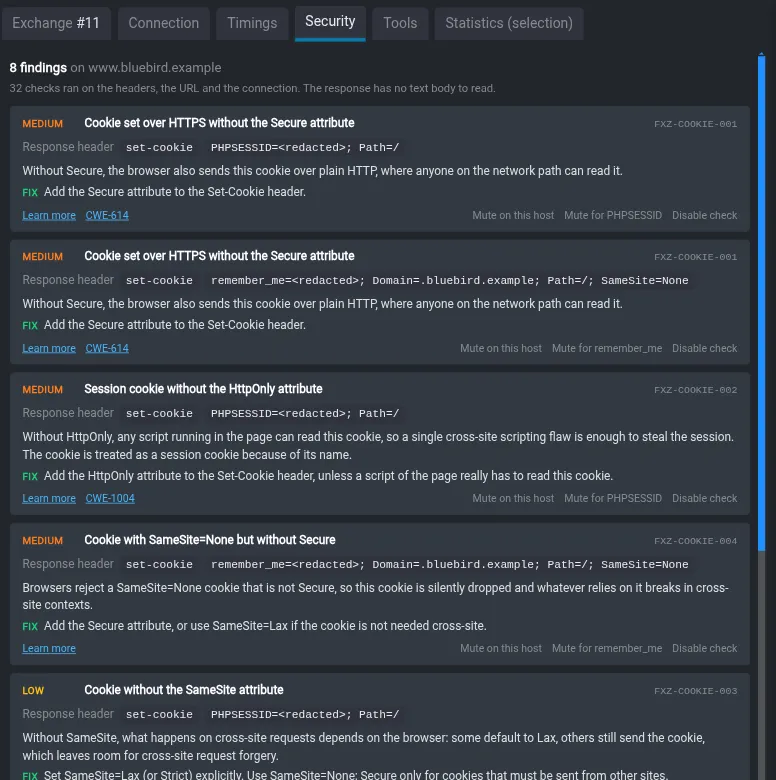
Notice that the cookie value is replaced by <redacted>. Secrets quoted as evidence are hidden in the app, in exported reports and in what AI agents receive. A security report that leaks the session cookie it complains about would be a bad joke.
From the same place you can silence what you have decided to accept:
- Mute on this host stops reporting that check on that host.
- Mute for one cookie, header or parameter is narrower. That is the right level for a cookie that is read by scripts on purpose.
- Disable check turns the check off everywhere.
By default a mute is stored in the capture file. Save the .fxzy, send it to a colleague, and they see the same findings muted, with a "Muted in this file" tag. If you want a mute to apply to every capture on your machine, which is what you need for a monitoring run that produces a new file each time, promote it with "Mute in every file".
Try the fix before touching the server
This is the part a scanner cannot do, because a scanner is not sitting between the browser and the server.
Six findings are fixed with a response header: missing or short HSTS, missing Content-Security-Policy, missing nosniff, missing framing protection and version banners. For those, the finding has a Try the fix link. Fluxzy adds a rule that applies the fix to the responses of that host, on your machine only.
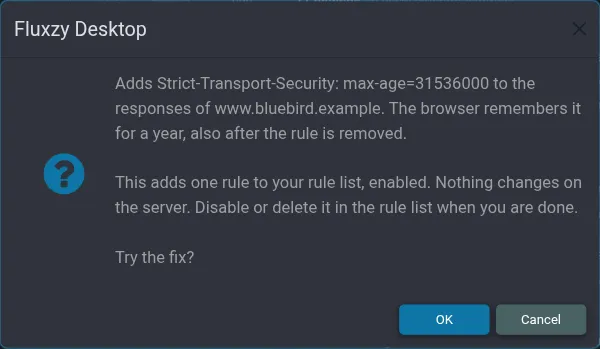
Reload the page through Fluxzy and you see the site as it would behave with the header in place. If a strict Content-Security-Policy breaks your inline scripts, you find out now, in your browser, and not after a deployment on a Friday.
The rule is an ordinary Fluxzy rule. It shows in the rule list, you can edit it, disable it or delete it. Two things to know, and the confirmation says them as well: a browser remembers Strict-Transport-Security for the duration it was given, even after you remove the rule, and the trial policy for CSP is deliberately strict (default-src 'self').
Deep scan: secrets and stack traces in response bodies
Checking headers costs almost nothing. Reading bodies means reading the disk, so Fluxzy only does it when you ask:
- when you open the Security tab of an exchange, the body of that exchange is read
- when you press Deep scan in the security panel, every text response of the session is read
Only text is read (HTML, JSON, scripts, XML, plain text), up to the first 256 KB of each response. Images and downloads are skipped.
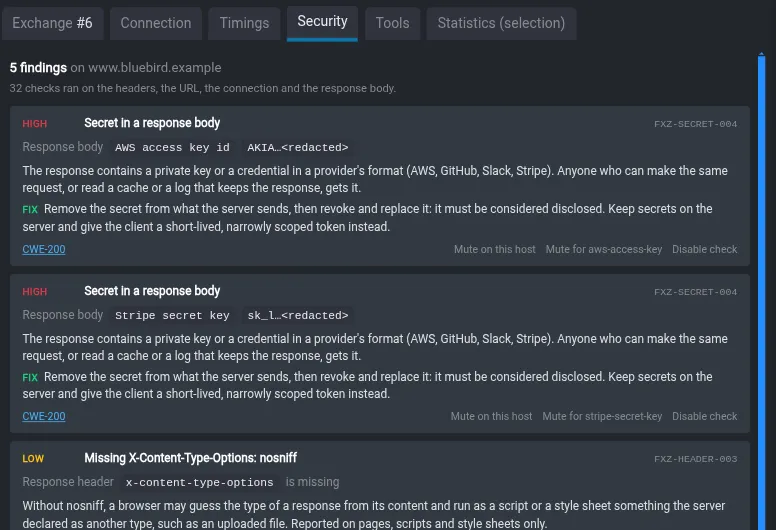
This is the check that tends to find something on the first run. A JavaScript bundle shipped with a provider key that was meant for the server is far more common than anyone likes to admit.
Reports, baselines and a gate for your pipeline
The security panel exports the session as JSON, SARIF or Markdown. SARIF is the format that code scanning tools read, including GitHub code scanning, so findings can land next to the results of your static analysis. Markdown is for people: paste it in a ticket or a pull request.
A report can also be compared with one you exported earlier. Each finding is then labelled new, worsened, unchanged or fixed. Findings are identified by check, host and key (the cookie, header or parameter name), not by exchange number, so two captures of the same user journey line up.
That gives a simple routine. Run your end-to-end tests through Fluxzy on the main branch and keep the report as the baseline. Run them again on a feature branch and fail the build only on what is new:
# Start Fluxzy Desktop with a token of your own so a script can call its local API
export FLUXZY_DESKTOP_API_TOKEN="$(openssl rand -hex 32)"

# ... run the tests through the proxy, then ask for the report

curl -s -X POST http://localhost:10985/api/security/report/export \
     -H "Authorization: Bearer $FLUXZY_DESKTOP_API_TOKEN" \
     -H 'content-type: application/json' \
     -d '{"baselineFileName":"/path/to/baseline.json","newOnly":true,"failOn":"Medium"}' \
  | jq -e '.summary.gate == "passed"'
failOn adds a gate field to the summary, passed or failed. Add "format":"sarif" to get SARIF and "deep":true to include the body checks.
If you work with a coding agent, the built-in MCP server exposes the same findings through two read-only tools, fluxzy_security_report for the session and fluxzy_security_findings for one exchange. "Look at the capture and fix the cookie flags in our auth middleware" is now a reasonable thing to ask.
Does it slow down the capture?
No. Nothing runs on the proxy path. When an exchange completes, the capture only puts it in a queue. A background worker runs the checks, and the interface is updated at most twice a second.
There are three modes, in the security panel and in Settings > Security insights:
- Live (the default): every completed exchange is checked, rows get their badge as traffic comes in.
- On demand: nothing runs in the background. An exchange is checked when you open its Security tab, the session when you open the panel.
- Off: no checks, no badges, no Security tab.
macOS: capture without typing your password every time
Transparent capture and raw packet capture need root on macOS. Until now Fluxzy asked for your password in its own dialog at each start. That was annoying, it had no Touch ID, and a custom password box is exactly what a security tool should not show you.
Fluxzy Desktop 2.6 replaces it with a privileged helper, the mechanism macOS provides for this:
- The helper is installed on demand, the first time you start a transparent capture or enable raw packet capture. macOS asks for your password or Touch ID once, in its own native prompt.
- After that, starting a capture asks nothing. Your password never reaches Fluxzy.
- macOS may ask you to approve the helper in System Settings > Login Items. Fluxzy then appears in the "Allow in the Background" list. The capture dialog tells you when this is needed.
- You can see its status, install it or remove it in Settings > Capture > Privileged Helper.
Since this is a root daemon, here is exactly what it does. It is a launcher and nothing else: it starts the capture components that ship inside the Fluxzy app bundle. It only accepts requests from an application signed by Fluxzy, and it checks the signature of what it launches. It contains no capture logic of its own.
The helper needs macOS 13 or later. On older versions, or if you prefer not to install it, Fluxzy falls back to the native macOS authorization dialog. The custom password box is gone in every case.
Two fixes came with this work: switching capture mode while a password prompt was open no longer fails on a busy port, and the system tunnel is no longer torn down by mistake when a system tool returns no exit status.
The local API is now closed to web pages
Fluxzy Desktop is made of two parts: the window you see, and a local service that runs the proxy. They talk over HTTP on the loopback interface. The service has always listened on loopback only, but until now it accepted any request that reached it. 2.6 hardens this in two ways.
Requests from web pages are refused. The service now rejects any request whose Host is not a loopback address, which blocks DNS rebinding, and any request sent by a web page from another origin. A site you visit cannot talk to the Fluxzy running on your machine.
Every launch has its own token. The app generates a random token at startup and sends it with each call. Without it the service answers 401. This keeps out another user of the same machine, a browser extension or a local tool tricked into fetching a URL.
If you script Fluxzy through its local API, set FLUXZY_DESKTOP_API_TOKEN yourself before starting the app and send it as Authorization: Bearer, as in the example above. The MCP endpoint keeps its own token and is not affected.
Smaller changes
File prompts that say what their buttons do
Opening a capture while another one is in progress used to ask a question answered by Yes, No or Cancel, and you had to read it twice to know which was which. The prompt now offers Replace, Append or Cancel, names the file and tells you how many exchanges are in the current session. A "Don't ask again" box remembers your choice.
Everything that closes a capture (opening a file, creating a new one, quitting, restarting for an update) now asks the same thing: Save, Don't save or Cancel. Before, saving was not offered at that point.
Buttons follow the order of your platform, the default one has the focus, Enter triggers it and the arrow keys move between them.
Fixed
- Captures recorded without raw packets: appending such a file to a session, or duplicating or copying its exchanges, failed with an error. Fixed.
- Scaled displays: at 125% or 150% the exchange list stopped following new exchanges, and switching between row and column layout left a blank area until the window was resized. Both are fixed, along with a small gap under the last row.
- Double-click on an exchange now opens the selection panel on the header view.
Under the hood
- Fluxzy.Core 1.39.53, and the bundled .NET runtime moves to 10.0.15, the security release of November 10, 2026.
- Tauri 2.12.5 and Angular 21.2.26, with dependency updates that close several security advisories.
Questions you may have
Is the security analysis sent to a server? No. The checks run on your machine, on traffic that is already on your disk. No request is replayed, nothing is uploaded, and there is no account requirement for this feature.
Is it free? Yes. Security insights are part of the free version of Fluxzy Desktop, reports and deep scan included.
Does it replace a penetration test? No. It only sees what the capture shows. It will not find an injection or a broken access control. What it does is remove the easy findings before the audit, and keep them from coming back afterwards.
Can I use it on an application I do not own? It only reads traffic that your own machine exchanged, so there is nothing intrusive about it. Declare your hosts in the settings and everything else is treated as third party.
How do I turn it off? Set the mode to Off in the security panel or in Settings > Security insights.
Fluxzy Desktop 2.6 is available now for Windows, macOS, and Linux. Download it here. If you installed from the apt or dnf repository on Linux, your package manager already has it.
Found a bug, a false positive or a check you would like to see? Open an issue on GitHub.